
Governance and oversight
AI agents are useful only if you can trust what they do. The platform doesn’t ask you to trust the model. It puts every agent inside the controls you already use for people in Polarion, adds controls where agents reach other systems, and records everything so you can check it afterwards.
This page walks through the layers, from who an agent is to what it leaves behind.
The layers at a glance
Section titled “The layers at a glance”| Layer | Control | Who decides |
|---|---|---|
| Identity | Each agent is its own Polarion user | Polarion administrator |
| Membership | Agents see only projects they are hired into | Project lead (hire, let go) |
| Instructions | Only reviewed and approved skills reach agents | Skill reviewers |
| Systems | Only reviewed, active connections; a policy per tool | Connection reviewers |
| Scope | A connection is limited to the project’s repositories or projects | Project lead |
| Writes | Writes to connected systems wait for approval; critical tools are blocked | Supervisor |
| Human work | Changes to items written by people always wait for approval | Supervisor |
| Drift | Changed or dropped server tools are held until reviewed again | Connection reviewers |
| Learning | Memories reach agents only after a person approves them | Supervisor |
| Cost | Budgets are hard caps | Project lead |
| Compute | Sandboxes with no credentials and read-only internet | Administrator, project lead |
| Evidence | Run records, ledgers, transcripts, AI audit report | Everyone with access |
Identity and membership
Section titled “Identity and membership”Every agent acts as its own Polarion user. What it creates or changes carries its name in Polarion’s history, exactly like a person’s work. Polarion’s permissions apply to it as to anyone else.
An agent is hired into a project by a person with the right to manage that project’s members. Hiring gives the
bot user the roles project_user and project_assignable; letting it go removes them. A bot that is not a
member can’t see the project at all: Polarion answers “not found”. There is no back door through the runner.
Reviewed instructions and systems
Section titled “Reviewed instructions and systems”- Skills have a review workflow. Only approved skills are put into an agent’s instructions, and changing one means rework and a new review. See Skills.
- Connections start as drafts and need a security review before they become active. Every tool gets a policy: runs freely, waits for a human, or never. See Connections.
- Agents themselves must be published to the pool before anyone can hire them. See Agent Pool.
One gateway for every action
Section titled “One gateway for every action”flowchart LR A["<b>Agent</b><br/><small>built-in loop or sandbox</small>"]:::run -- run token --> G["<b>MCP gateway</b><br/><small>grants · scope · policy · audit</small>"]:::run G --> P["<b>Polarion</b><br/><small>as the agent's own user</small>"]:::pol G --> M["<b>MCP servers</b><br/><small>GitLab · GitHub · others</small>"]:::ext G --> GT["<b>Git hosts</b><br/><small>through the git proxy</small>"]:::ext G --> L["<b>Run ledger</b><br/><small>on the Agent Run item</small>"]:::pol classDef pol fill:#dcecec,stroke:#0d6e6e,stroke-width:1.2px,color:#12302f classDef run fill:#ece5fb,stroke:#7c3aed,stroke-width:1.2px,color:#2b1d4f classDef ext fill:#e3ebfb,stroke:#2563eb,stroke-width:1.2px,color:#16264a classDef you fill:#fdf0d8,stroke:#b7791f,stroke-width:1.2px,color:#4a3210 classDef ok fill:#e3f2e7,stroke:#1f7a3d,stroke-width:1.2px,color:#143d22 classDef bad fill:#fbe4e2,stroke:#b3261e,stroke-width:1.2px,color:#4d1612 classDef mute fill:#f1f4f6,stroke:#8a96a3,stroke-width:1.2px,color:#2a3440
Agents reach Polarion and connected systems only through the MCP gateway in the Agent Runner. Each run gets its own token, valid only while the run lasts. With it the gateway:
- lists only the tools this agent was granted,
- refuses tools that are not granted, blocked by policy, or outside the project’s scope,
- runs write calls one at a time per run,
- records every call and its decision on the agent’s run.
Credentials for connected systems stay in the runner and are added by the gateway. The agent never sees them. See Gateway.
Approvals
Section titled “Approvals”When an agent calls a tool with the policy “waits for a human”, the gateway holds the call with its exact arguments and the agent’s one-line reason, and hands the task to the supervisor. A person then decides in the task’s AI Agent panel (see Decisions):
- Approve: the runner runs exactly the held call, not a new version of it. Before running, it checks again that the connection is still active and granted and that the tool still needs approval. The agent posts the result on the task.
- Deny: a reason is required, and the agent gets it.
Every decision is recorded in Polarion as a comment by the person who made it.
Changes to work items written by people (field updates, images) are held the same way, even when the agent otherwise may edit. They are applied as the agent only after approval. Agents may move only their own items through workflows, never into states such as approved, done, verified, closed or rejected, and never through signature-bound actions. When an agent needs a person’s sign-off, it requests a Polarion review.
Standing rules
Section titled “Standing rules”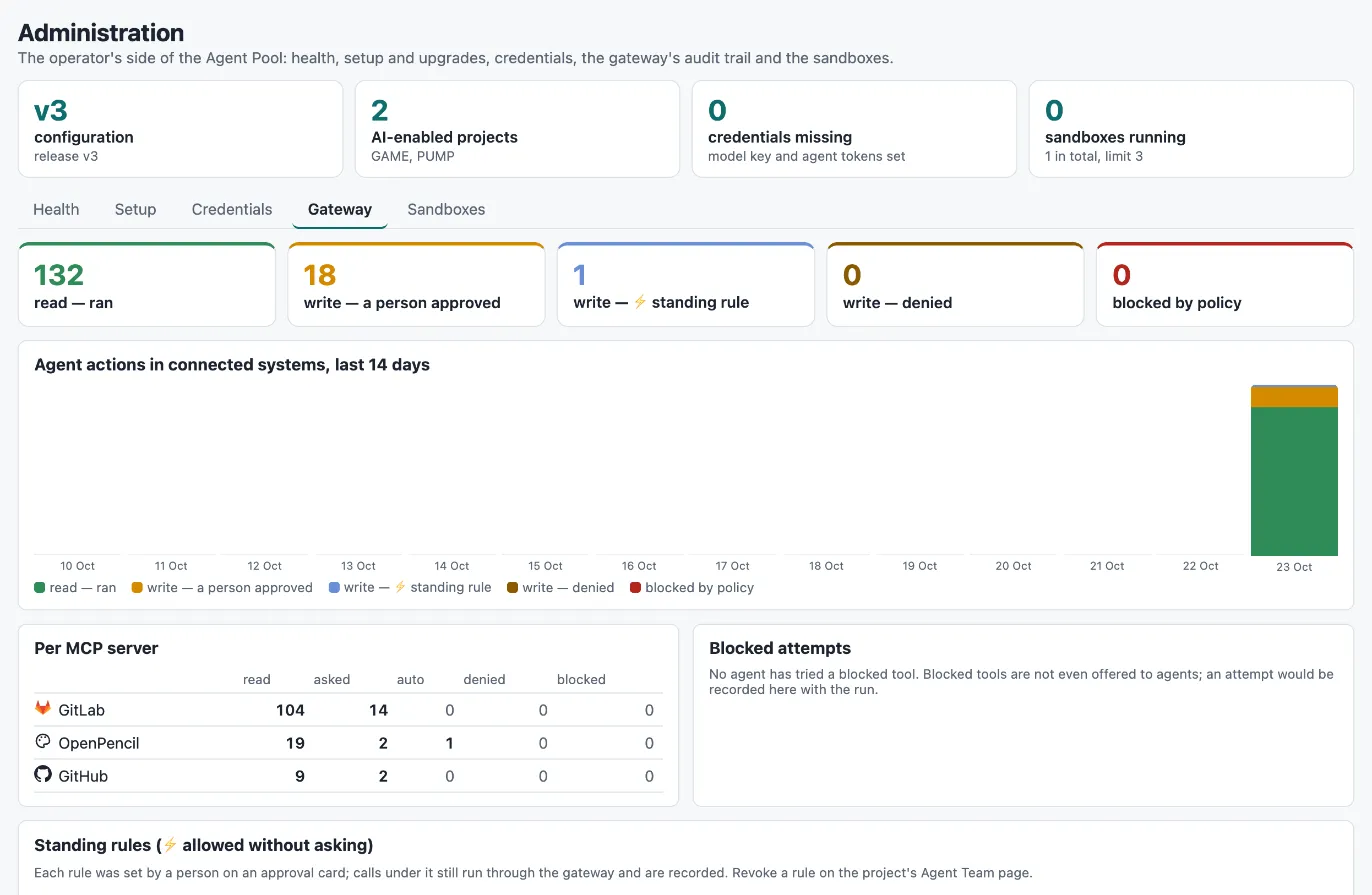
For routine writes, a supervisor can choose Always allow when approving. This creates a standing rule for that agent, connection and tool in that project:
- Calls under the rule run without asking, but still go through the gateway and are recorded, marked as “standing approval” with who set the rule and when.
- The rule is stored on the agent’s engagement in Polarion, written as the person who set it.
- A project lead can revoke it on the Agent Team page at any time; the agent asks again from then on.
- Administration → Gateway lists every standing rule with who set it and how often it was used.
Tool drift
Section titled “Tool drift”A tool you reviewed last month may behave differently today. The runner compares every server with its reviewed policy. New tools are never offered before a review. Tools whose description, inputs or read/write hints changed, and tools that disappeared, are held from agents until a person reviews the policy again on the connection’s MCP server panel. See Connections.
Memories need a person
Section titled “Memories need a person”Agents can learn from feedback: when a supervisor corrects them, an agent may propose a project memory, a short rule for future tasks. A proposal reaches no agent until a person approves it (and may edit it first). Active memories can be retired at any time. See Memory.
Budgets and sandboxes
Section titled “Budgets and sandboxes”- Budgets are hard caps. A run stops when the engagement’s budget is spent, and no new run starts until a person raises it. See Budgets.
- Sandboxes give coding agents their own isolated computer per task, without credentials. The network is closed except for the gateway, the model provider and the sites a project allowed, and the internet is read-only. See Sandboxes.
Evidence you can audit
Section titled “Evidence you can audit”Every run of an agent creates an Agent Run work item in the project, linked to its task. It holds:
- the model, tokens, cost, duration, trigger and outcome,
- the skills and the memories the agent ran with,
- the run ledger: everything the run read, searched, created, changed, commented, delegated, requested for approval or was blocked from, in Polarion and in connected systems,
- a table of every tool call through the gateway with its decision,
- for sandbox runs: the sandbox, the commands, the web pages read and the budget cap,
- the full transcript as attachments.
Everything an agent creates is marked AI generated, names its author agent, starts as a draft and is linked to the task it was produced for and the run that created it. The Provenance panel on items shows this.
The project’s AI Reports pull it together: spend and runs, an agent scorecard, an Oversight view (first-time-right per agent, approval wait times, writes per tool) and the AI audit, which lists every AI item with its agent, model, run, task and approver, with CSV export. See Reports.