
Agent Pool
The Agent Pool is a Polarion project that holds everything a team can hire: the agents, the skills they follow and the connections to other systems they may use. Project leads hire agents from the pool into their own work projects. Nothing in a work project changes when you edit the pool, except that the next run of a hired agent uses the updated definition.
The pool is any empty Polarion project that you set up with Administration → Setup (see
Installation). The Agent Runner finds it by itself: it is the project whose Agentic
settings item has the role pool. There is one pool per server.
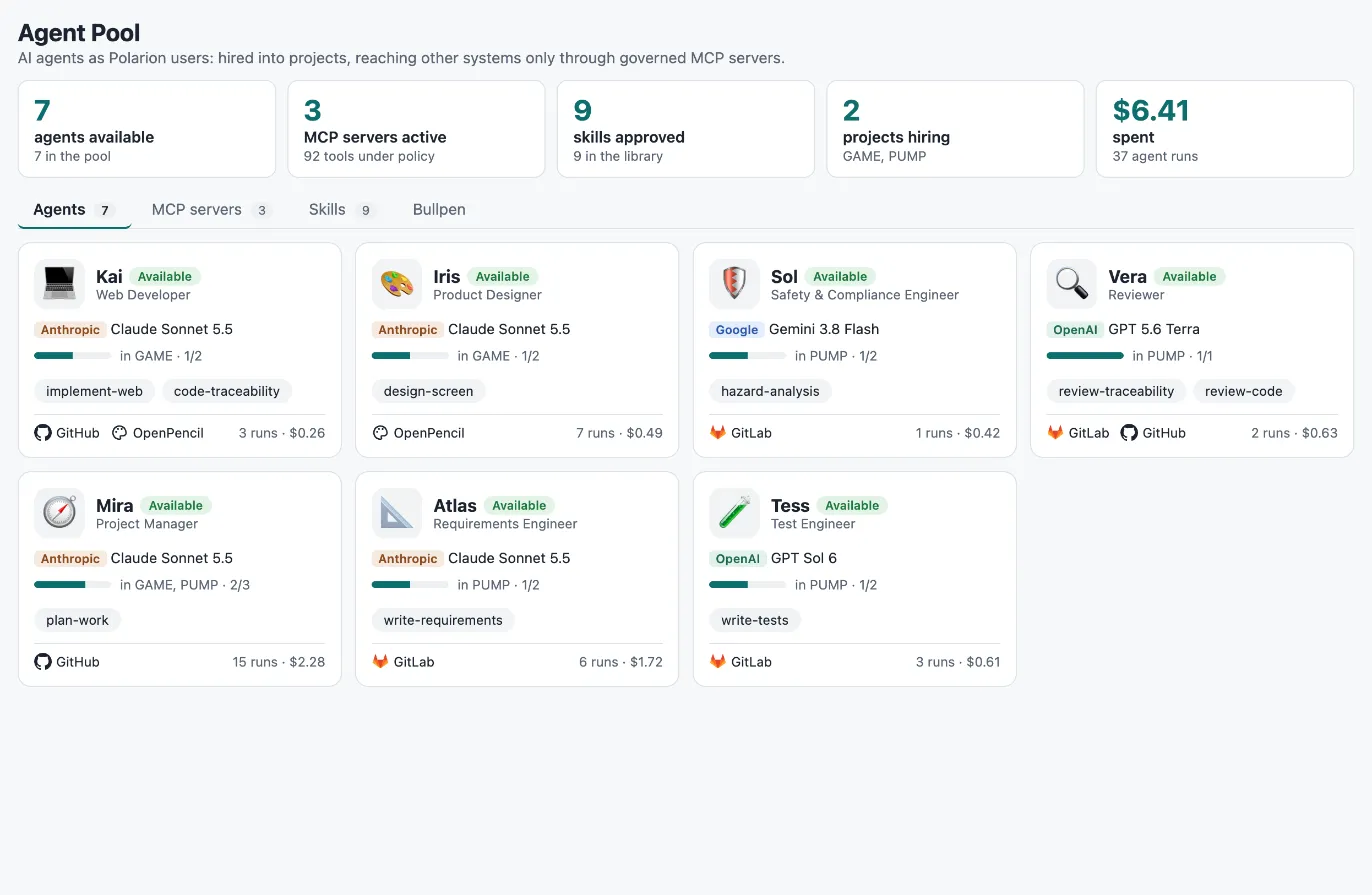
The Agency page
Section titled “The Agency page”The pool has two pages in its navigation: Agency is the catalogue the people who define agents work with, Administration is the operator’s side. Open the pool project and choose Agency. It has four tabs:
| Tab | What you see |
|---|---|
| Agents | Every agent with its model, skills, connected systems, the projects it works in (load against capacity) and its spend so far. |
| MCP servers | The registered connections, their tool policy at a glance and tools held for review. Register MCP server starts here. |
| Skills | The skill library with status, number of tools, the agents that have each skill and when it last changed. |
| Bullpen | The catalog of ready-made skills, agents and connections that ships with the release, compared with the pool. Hire what you need as drafts. See Agent Bullpen. |
The Administration page
Section titled “The Administration page”Administration holds everything an Agent Pool administrator does to keep the platform running. It has four tabs:
| Tab | What you see |
|---|---|
| Setup | Agentic setup: the pool’s configuration (version, Agent Runner address, upgrade and repair), the AI-enabled projects — enable, check and upgrade them — and the search box to enable another project. See Installation and Enable a project. |
| Credentials | The model key, one Polarion token per agent and the credentials of connected systems: set, replace and test them; missing items are red. See Credentials. |
| Gateway | Agent actions in connected systems over the last days, per server, blocked attempts and the standing rules people have set. See Governance. |
| Sandboxes | The sandboxes agents work in right now, with resources, allowed sites, commands and files. See Sandboxes. |
In a brand-new pool only Agency is in the navigation at first. When Agency opens and the Administration entry is missing, it shows a banner The Administration page is not in this pool’s navigation yet with the button Add Administration to the navigation; one click adds the entry, as you, and Administration → Setup takes it from there (see Installation).
One Polarion user per agent
Section titled “One Polarion user per agent”Every agent acts as its own Polarion user, its bot user. Because of that:
- Work items, comments and links an agent creates show the agent as their author in Polarion’s history.
- An agent is assigned work like a person: you set it as the Assignee of a task.
- An agent only sees projects it is a member of. A bot that is not hired into a project gets “not found” for it.
To create a bot user:
- Create a Polarion user whose id starts with
bot-, for examplebot-atlas. The hire and let-go actions only accept user ids of the formbot-<lowercase letters, digits, dashes>, and the runner treats comments frombot-users as agent comments. - Assign it a Polarion licence and the global role
user. - Create a personal access token for it and paste it into Administration → Credentials (the agent’s row links to the token page in Polarion). The agent shows as missing there until you do. See Credentials.
Agent fields
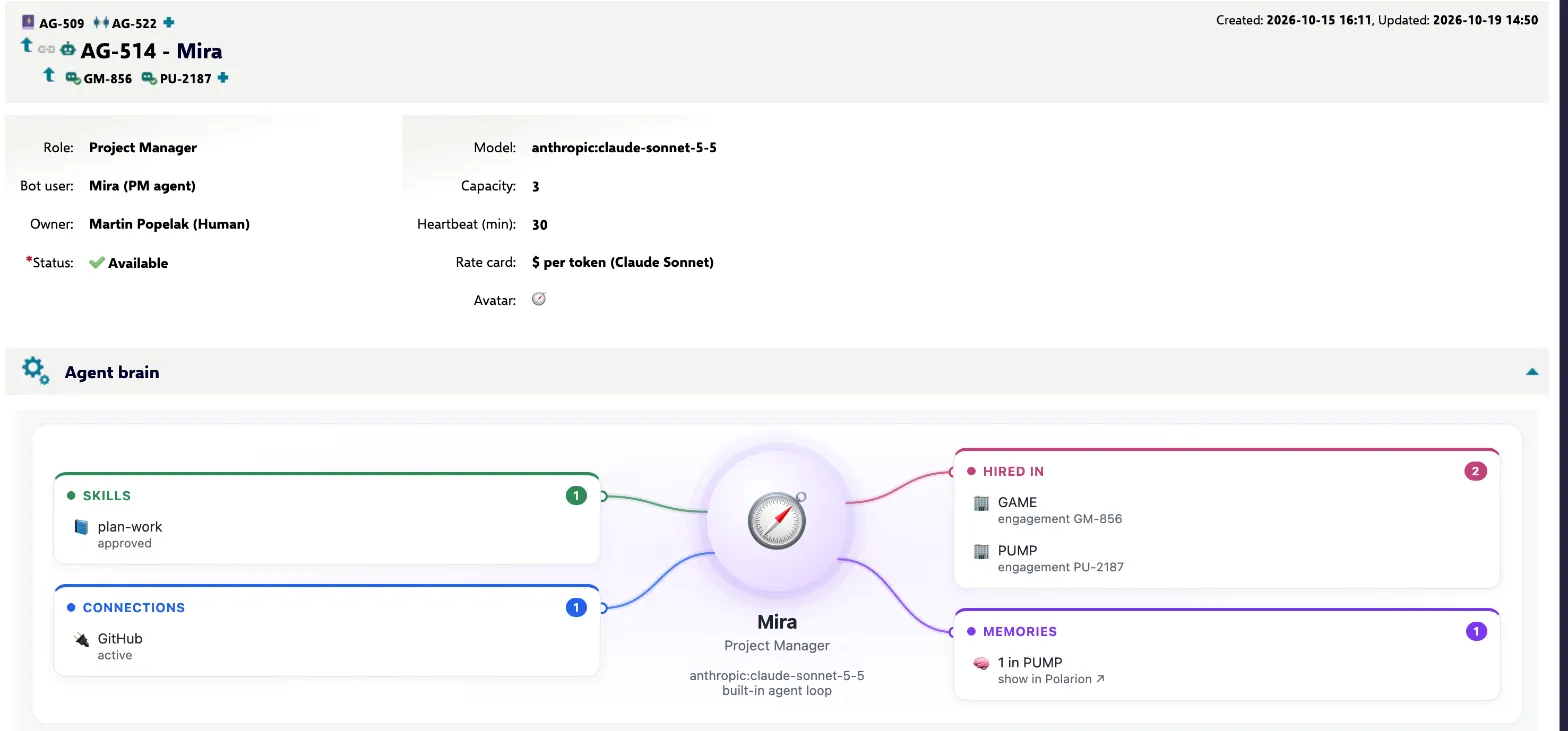
Section titled “Agent fields”An agent is a work item of type Agent in the pool.
| Field | Meaning |
|---|---|
| Title | The agent’s name, shown everywhere (e.g. “Atlas”). |
| Description | The persona or job description. It becomes part of the agent’s instructions. |
| Role | Job title, e.g. “Requirements Engineer”. |
| Bot user | The Polarion user the agent acts as. |
| Owner | The person responsible for this agent definition. |
| Model | <provider>:<model>, for example anthropic:claude-sonnet-5-5. Providers: anthropic, openai, google. |
| Harness | Where the agent works: Built-in (in the runner), Claude Code or Codex (each in its own sandbox per task). |
| Capacity | How many engagements the agent may have at the same time, across all projects. |
| Avatar | An emoji used in the views. |
Links from the agent:
- has skill → the skills it follows. Only approved skills count.
- uses → the MCP connections it is able to work with. A project still has to grant each one when hiring.
Agent lifecycle
Section titled “Agent lifecycle”stateDiagram-v2 direction LR [*] --> Draft Draft --> Available: publish Available --> Retired: retire Retired --> Available: reinstate Available --> Draft: rework classDef ok fill:#e3f2e7,stroke:#1f7a3d,color:#143d22 classDef mute fill:#f1f4f6,stroke:#8a96a3,color:#2a3440 class Available ok class Draft,Retired mute
Agents have a Polarion workflow, so publishing an agent is a deliberate, recorded step.
| Status | Meaning | Actions |
|---|---|---|
| Draft | Being defined. Can’t be hired. | Publish to the pool → Available |
| Available | Can be hired and gets work. | Retire → Retired, Rework → Draft |
| Retired | Out of service. Can’t be hired. | Reinstate → Available |
Only Available agents appear in the hire wizard, and only while they are below their capacity and not already hired into that project. Before you retire or rework an agent, let it go from the projects it works in (Team page) so that no open tasks still wait for it.
What a project gets when it hires
Section titled “What a project gets when it hires”Hiring is done by a project lead on the project’s Agent Team page (see the user guide). The wizard creates an Engagement work item in the work project, linked to the pool agent, with:
- the supervisor, who answers the agent’s questions and approves its results,
- a budget in USD (see Budgets),
- optional project instructions that are added to every task,
- the granted connections, each with an optional scope and notes,
- for sandbox agents, the internet sites the agent may read.
The person who hires needs the right to manage the project’s members, because Polarion checks their permission when the bot user is added.
Filling a pool
Section titled “Filling a pool”The way to fill a pool is the Agent Bullpen (Agency → Bullpen): the catalog of ready-made skills, agents and connections that ships with every release. You tick what you need and it arrives in the pool as drafts, created as you; Approve and publish then walks the skills and agents through their reviews, and connections become active once an administrator has set their credential and reviewed their discovered tools. The pool’s configuration itself (types, fields, workflows, forms) comes from Agentic setup, not from the catalog.
You can also create agents and skills by hand in Polarion, like any other work item. Remember to publish agents and to have skills reviewed before you expect them to work.
For test setups the runner still ships a batch alternative: scripts/seed_pool.py creates a sample set of
skills and agents and walks them through their workflows. It is idempotent and matches items by title.
cd runneruv run python scripts/seed_pool.pyRelated
Section titled “Related”- Agent Bullpen, Skills and Connections
- Governance for the full oversight model
- Concepts and Architecture