
Enable a project
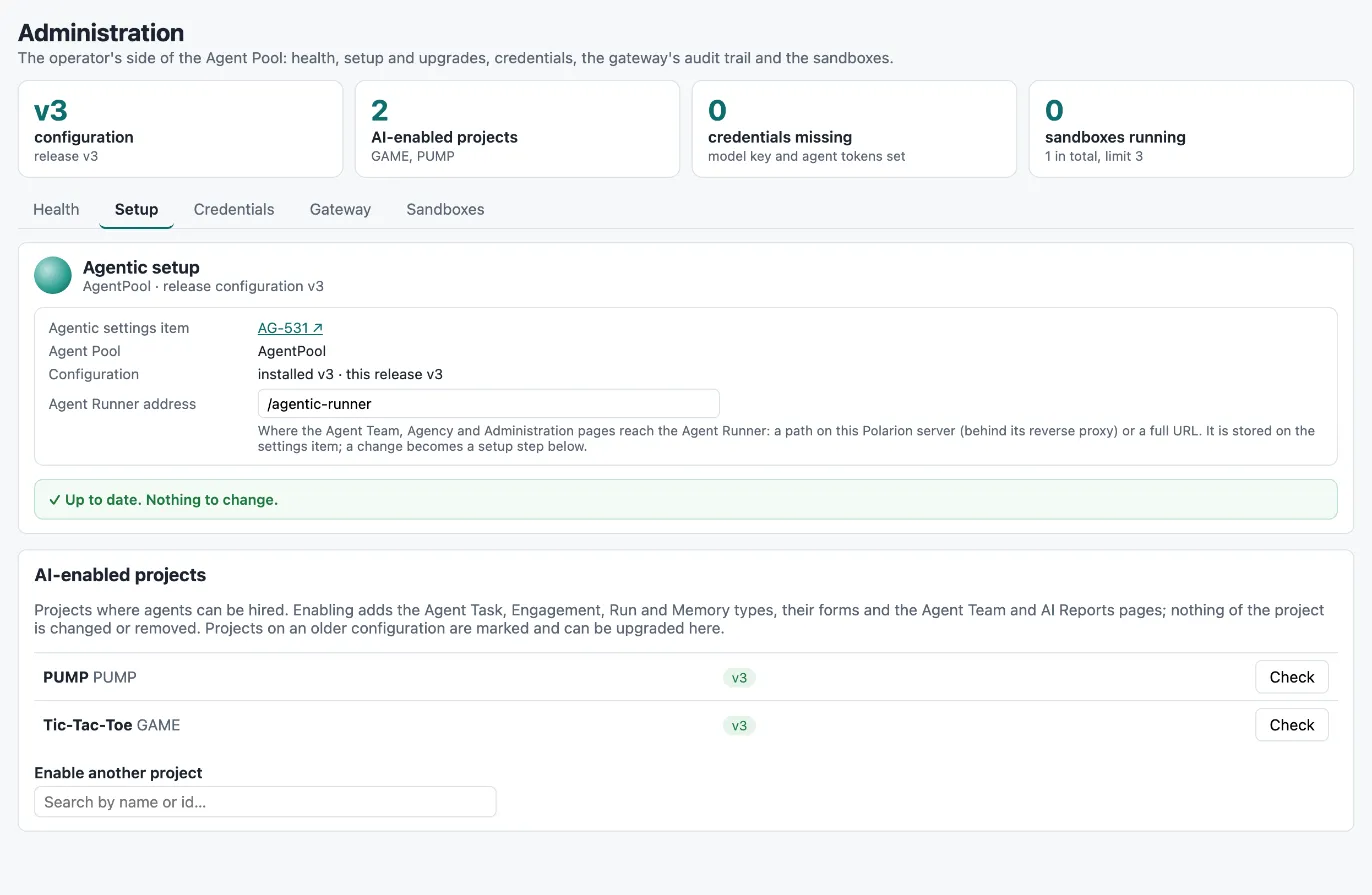
Agents can only be hired into projects that are AI-enabled: projects that have the Agentic work item types, forms and pages. Enabling is done from the Agent Pool project, on Administration → Setup, and takes a minute. It adds to the project and never removes or changes what is already there.
What enabling adds
Section titled “What enabling adds”flowchart LR A["<b>Administration → Setup</b><br/><small>in the Agent Pool</small>"]:::you -- Enable --> W["<b>Work project</b><br/><small>your requirements, tests, code</small>"]:::pol W --> T["<b>Agentic types</b><br/><small>Agent Task · Engagement · Run · Memory</small>"]:::pol W --> F["<b>Forms and lifecycles</b><br/><small>panels · statuses · memory workflow</small>"]:::pol W --> N["<b>Pages</b><br/><small>Agent Team · AI Reports</small>"]:::pol W --> S["<b>Agentic settings</b><br/><small>role work · configuration version</small>"]:::pol N --> H["<b>Hire</b><br/><small>Agent Team page</small>"]:::ok classDef pol fill:#dcecec,stroke:#0d6e6e,stroke-width:1.2px,color:#12302f classDef run fill:#ece5fb,stroke:#7c3aed,stroke-width:1.2px,color:#2b1d4f classDef ext fill:#e3ebfb,stroke:#2563eb,stroke-width:1.2px,color:#16264a classDef you fill:#fdf0d8,stroke:#b7791f,stroke-width:1.2px,color:#4a3210 classDef ok fill:#e3f2e7,stroke:#1f7a3d,stroke-width:1.2px,color:#143d22 classDef bad fill:#fbe4e2,stroke:#b3261e,stroke-width:1.2px,color:#4d1612 classDef mute fill:#f1f4f6,stroke:#8a96a3,stroke-width:1.2px,color:#2a3440
| Added | Details |
|---|---|
| Work item types | Agent Task (aiTask), Agent Engagement (aiEngagement), Agent Run (aiRun), Agent Memory (aiMemory) and Agentic Settings (aiSettings), with their fields and type icons |
| Enumerations | ai-engagement-status, ai-run-outcome, ai-run-trigger |
| Link roles | ai_engages, ai_reports_to, ai_produced_by, ai_run_of, ai_created_by_run, ai_modified_by_run, ai_learned_from |
| Hyperlink roles | tracked_in, implemented_in, verified_by for links to connected systems |
| Provenance fields | aiGenerated and authorAgent on all work item types |
| Lifecycles | The status lists of Agent Task and Agent Memory, and the Agent Memory workflow |
| Forms | Form layouts for the four types, with the AI Agent task panel and the Agent brain |
| Navigation | Agent Team and AI Reports |
| Settings | An Agentic settings item with role work and the configuration version |
The project’s own Task type and every other type, field, workflow and page stay as they are. Agents work on
Agent Task items, so your existing task boards and workflows are not affected. All Agentic identifiers carry
an ai prefix for the same reason: they cannot clash with your configuration. See Data model.
Enabling a project
Section titled “Enabling a project”- Open the Agent Pool project and choose Administration → Setup.
- Under AI-enabled projects, type the project’s name or id into Enable another project. Servers can have hundreds of projects, so the list loads on your first search and shows the matches.
- Click Enable next to the project. The plan opens: it lists every type, field, form and page that will be added. There are no red steps for a work project.
- Click Apply. The changes are made as you — the data model over the REST API with your token, forms, workflows and navigation as commits in the project’s repository under your name. The page scans again and shows Up to date — applied and verified.
- Reload the project. Agent Team and AI Reports appear in its navigation, and the team can hire its first agent (see Hiring).
You need the right to manage the project’s configuration in Polarion, since every change is made as you.
Upgrades and repair
Section titled “Upgrades and repair”Every release ships a versioned configuration. The list of AI-enabled projects shows each project’s version:
- A project on the current version shows a green version badge and a Check button. Check scans the project again and repairs anything missing or changed — a field that was deleted, a form layout that was edited, a navigation entry that went missing. On an up-to-date project, applying changes nothing.
- A project on an older version is marked v1 → v2 with an Upgrade button. The upgrade plan shows exactly what the new release adds; apply it the same way.
First setup, upgrade and repair are the same engine: it compares the project with the release configuration and applies only the difference. The Agent Pool itself is checked and upgraded at the top of the same page.
Taking a project out
Section titled “Taking a project out”There is no “disable”. To stop agents in a project, let them go on the Agent Team page (see Operations). The Agentic types and pages stay; items agents created remain part of the project’s history.